
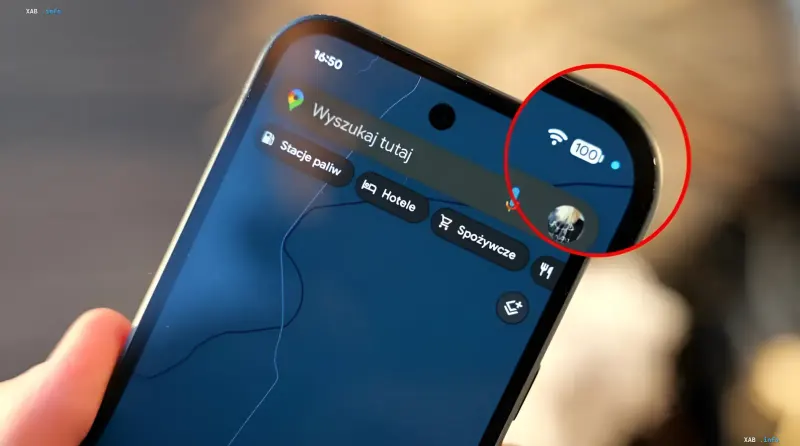
Users of devices running the latest Android 17 operating system have started noticing changes in the interface. A new graphical element has appeared in the status bar — a blue dot. Immediately after the update appeared, questions arose online about the nature of this signal, but technical reviewers have already given a definitive answer: this is not a software glitch, but an important element of Google's updated privacy policy.
New data transparency standard
The introduction of the blue indicator is part of a major overhaul of the user data security system. If previously green or orange markers were used to alert about access to critical resources, such as the camera or microphone (the color of which could vary depending on the manufacturer's graphical shell), now geolocation has received its own unique visual signal.
The main goal of the new feature is to minimize the risks of unauthorized location tracking. The indicator activates automatically at the moments when installed software products request access to geodata. This happens both in active mode and in the background, allowing the user to control exactly which services "know" where they are.
How the protection mechanism works
The algorithm of the new function is transparent and works in real time. The process of recording application activity is built on three stages:
- Request initiation: Any application, whether it is a mapping service, taxi, or delivery, requests coordinates via satellite systems (GPS/GLONASS) or via cellular base station data.
- Marker activation: The operating system instantly reacts to the request, displaying a blue dot in the top panel of the screen.
- Deactivation: The indicator disappears immediately after the geodata exchange session is terminated.
Control and permission management
According to Google's security regulations, the appearance of the blue marker signals exclusively the fact of access to the GPS module. This gives the user the opportunity to audit their smartphone's activity. If you see the indicator at a time when navigation functions are not needed, it may indicate the background operation of third-party software.
In case of suspicious activity, the system provides a standard procedure for verification and revocation of permissions. The user can go to the "Privacy and Security" menu, select the "Permission Manager" item, and restrict access to geolocation for a specific application. Thus, Android 17 places control over personal data in the hands of the device owner, making tracking processes transparent and visible.


