In the latest update of its proprietary Nvidia App (build 11.0.9.565), Nvidia has introduced a local Model Context Protocol (MCP) server, granting compatible AI assistants direct access to control graphics driver features and the gaming environment on the user's PC. Notably, after installing the update, this option is activated automatically—without any explicit consent, popup window, or other action from the user. In the release notes, Nvidia mentions MCP support but does not explain why the server is enabled by default.
What is MCP and how the new server works
The MCP server operates exclusively in a local environment: it listens on the loopback address 127.0.0.1 at port 13508 and provides an HTTP interface for compatible software running on the same device. This means Nvidia is not connecting any external AI service to the user's computer. Nevertheless, the running server makes Nvidia App features available to any compatible software operating on the same PC. For users who do not use AI agents, there is little point in keeping this interface active, as it performs no useful tasks without an external "client".
What functions AI agents receive
According to Nvidia, compatible AI assistants—with examples such as Hermes, OpenClaw, and Perplexity mentioned in the documentation—can interact with the Nvidia App using natural language commands. The list of capabilities includes: discovering installed games, launching applications, applying recommended graphics settings, enabling ShadowPlay recording, taking screenshots, managing performance overlays, retrieving driver information, and modifying certain power settings on laptops. Effectively, the AI agent receives a fairly wide set of tools to automate routine operations with the graphical environment.
Privacy and risks: what happens to data
Most users likely do not have such AI agents installed at all. Those who use them often rely on external services—such as those from OpenAI—rather than local models. In this case, information obtained from the Nvidia App via the MCP server may be transmitted to external servers, depending on the architecture of the specific agent. Running full-scale AI models locally generally requires significant hardware resources: computers equipped with high-memory graphics cards or specialized systems like RTX Spark. Although less demanding models exist, their functionality and performance leave much to be desired. Thus, the real risk of data leakage stems not from the MCP server itself, but from where the specific AI agent connected to it directs the information.
Why it is enabled by default and Nvidia's stance
In the release notes, Nvidia limits itself to mentioning MCP support without providing explanations as to why the server activates automatically. This has raised justified questions within the community: if a user does not have compatible software for AI agents installed, a server enabled by default serves no functional purpose while creating a potential attack surface and simplifying unauthorized access to driver features. A sensible solution, according to experts, would be to display a popup upon the first launch after the update asking whether the user wants to activate this feature—similar to how new services are connected in other applications.
How to disable automatic AI agent access
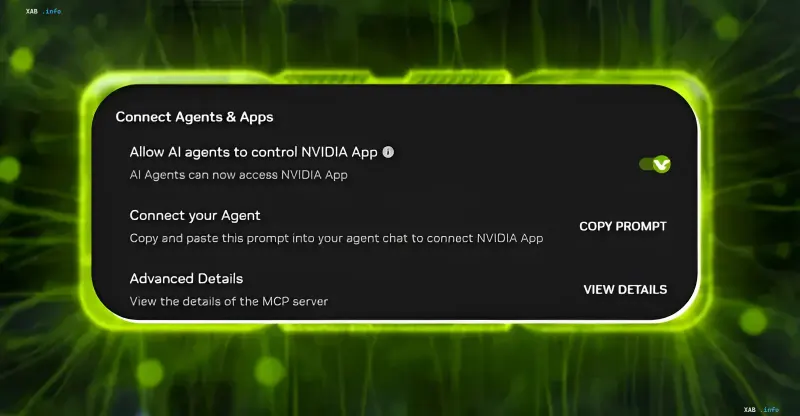
Users can disable the new feature directly within the Nvidia App. To do this, go to Settings → Features, scroll down to the "Connect Agents & Apps" section, and turn off the option "Allow AI agents to control NVIDIA App". The toggle switch will change color from green to gray. According to Nvidia's MCP documentation, disabling this toggle prevents the persistently running MCP server from launching. If necessary, the feature can be re-enabled through the same menu. Users who have installed the latest Nvidia App update are advised to check whether this option was activated automatically on their system.