Windows Task Manager has remained one of the most in-demand built-in utilities of the operating system for more than two decades. It is precisely this tool that allows experienced users and system administrators to see which processes are running on the system, how many resources each of them consumes, and exactly where performance is "stalling." Now Microsoft has taken a notable step toward adapting this tool to the era of local artificial intelligence: Task Manager now includes support for monitoring AI workloads, i.e., the activity of neural engines on NPU processors and GPU graphics processors.
From a "Unix-like impulse" to neural chips
The utility's history dates back to the 1990s. As its creator Dave Plummer explained, the appearance of Task Manager was a "very Unix-like impulse" — an attempt to bring into the Windows graphical environment the process control mechanisms familiar to system administrators. By this logic, adapting the tool to modern computational workloads looks like a natural continuation of its evolution. Microsoft explained that previously the "Processes" tab did not show the activity of either the neural processor (NPU) or the graphics processor (GPU) for each individual process — the user could only see CPU and memory consumption.
What exactly changed in the interface
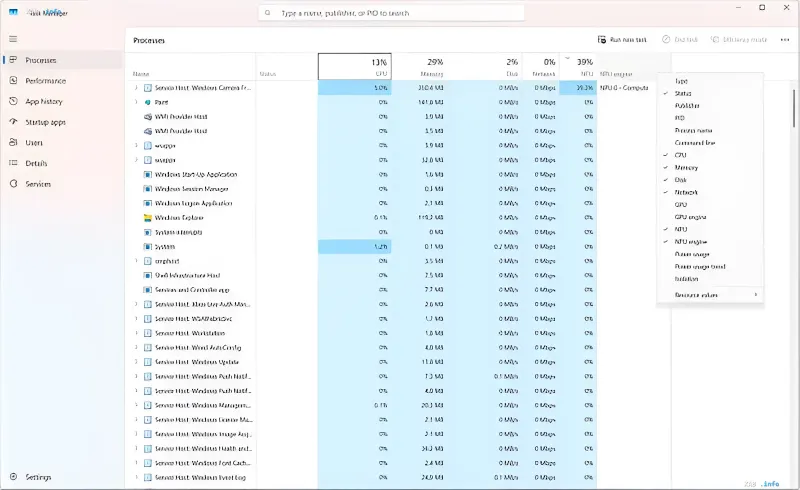
On compatible devices, the "Processes" tab can now display NPU utilization alongside the central and graphics processors, while the overall summary of computational resources is shown in the "Performance" tab. Thus, for the first time, the user gets a unified picture in the familiar interface: which specific applications are using the neural cores, how heavily the GPU is loaded with AI tasks, and how this relates to the work of the CPU, memory, storage, and network. According to Microsoft, visibility into NPU and GPU resource consumption "can help you make more informed decisions" as local AI workloads on Windows devices become increasingly common.
Why this matters to users and developers
The practical benefit of the feature goes beyond mere curiosity. Knowing which process is using a given piece of hardware, you can diagnose performance problems and, especially important for laptop owners, power consumption problems: background AI processing, invisible to the eye, can noticeably reduce battery life. For developers of local AI applications, the new columns become a debugging and optimization tool — you can directly see how the neural engine distributes the load between CPU, GPU, and NPU. The only caveat, which Microsoft points out, is that Task Manager still allocates more resources to monitoring tasks rather than managing them, so the tool remains primarily diagnostic.
Contradictory data
Fact-checking revealed discrepancies among sources regarding the status of the feature's implementation. Some publications (including 3DNews and SecurityLab) frame the news as an already implemented change — "Microsoft added AI workload monitoring to Task Manager," "Task Manager learned to track neural chips." Other sources (for example, Goha) use future-tense wording — "Windows 11 Task Manager will learn to monitor GPU neural engines," which is characteristic of an announcement or preview/staged rollout stage. The fact of adding NPU/GPU support to the "Processes" and "Performance" tabs is confirmed by all sources, however, the exact stage of feature availability (full release versus staged rollout) is not unambiguously established in the provided materials.
Conclusion
Adding AI workload monitoring to Task Manager is a logical and timely step by Microsoft: a tool created as "Unix-like" process control is catching up with reality, in which a significant portion of PC computations is performed by neural cores. If the new capabilities are implemented without compromising the speed and simplicity that made Task Manager indispensable, this will strengthen its position as the primary diagnostic tool for both users and local AI developers.